Reviewed · TOKYO TOURS
Japan: eSIM with Unlimited Local 4G/5G Data
Japan without roaming data stress. This eSIM plan is built for fast unlimited 5G/4G data across Japan, with a simple QR install process. You pick Ultra or Lite, scan the right code, and get on the KDDI au network once you arrive.
What I like most is how quickly you can go from plan to connection, since the setup hinges on one clean action, scan and activate. I also like the fact that you can avoid a physical SIM card entirely, which matters when you are moving fast between Tokyo, Kyoto, Osaka, and beyond. The only watch-out is the timing and QR details, because the QR code in your voucher is not the actual eSIM code.
Another potential consideration is speed behavior. The plan is unlimited, but Lite caps data speed at 10Mbps, and 5G can drop to 4G indoors, underground, or in crowded areas.
Key things that make this eSIM worth your attention
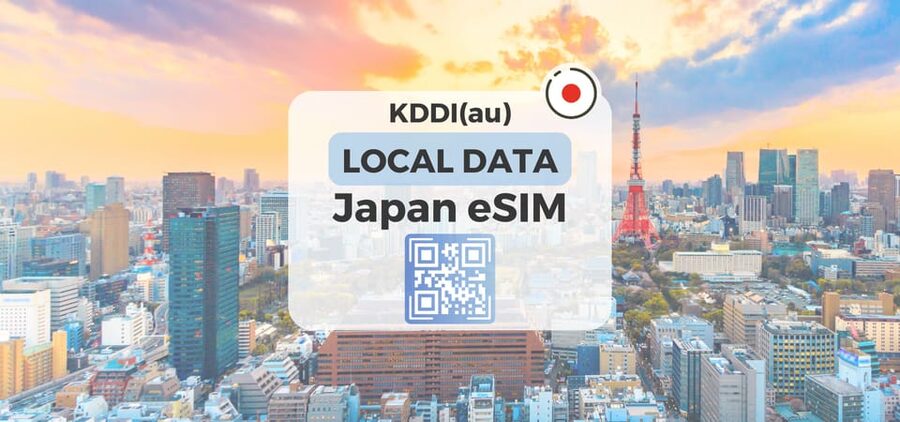
- Unlimited local 5G/4G data on Japan’s KDDI au network, no physical SIM needed
- Ultra vs Lite options: unthrottled on Ultra, speed-capped at 10Mbps on Lite
- Correct QR code timing: the real eSIM QR arrives by email 1 day before your activity date
- Hotspot sharing works but with limitations depending on the selected plan
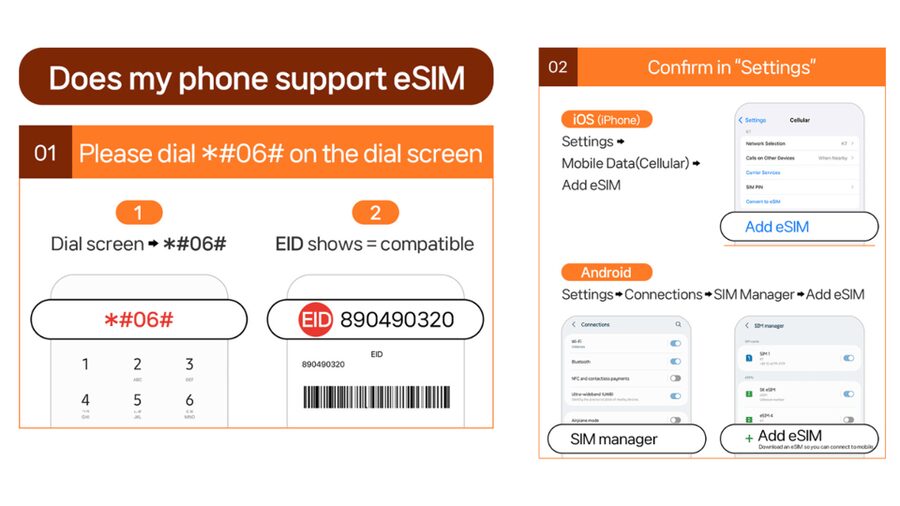
- Device compatibility matters: check for eSIM support using EID before you buy
What This $10 eSIM Actually Gives You in Japan
This service is all about one thing, staying connected in Japan with local data that you can use immediately after installation and activation. You get unlimited 5G/4G local data, with coverage across Japan through KDDI au. That means maps, ride-hailing, messaging over data, and downloading tickets can all run without the usual “how much data is left” anxiety.
You also get real flexibility in how long you can stay online. The Ultra plan can run for 3 to 30 days, while Lite is 3 to 10 days. If your trip is shorter and you mainly need navigation, messaging, and streaming occasionally, Lite can be a straightforward value play. If your trip is longer or you care about consistent speed, Ultra is built for that.
One more important detail: this is data-only. Voice calls and SMS are listed as not included. So if your phone relies on SMS for things like verification codes, you’ll want a backup plan (like using an authenticator app or having access to Wi-Fi for any SMS-based steps). The good news is that most modern travel apps work fine over data.
A few more Tokyo days worth comparing
- Mt Fuji and Hakone 1-Day Bus Tour Return by Bullet Train
★ 5.0 · 26,383 reviews - 1-Day Tokyo Bus Tour
★ 5.0 · 14,250 reviews - Tokyo: TOKYO SKYTREE® Admission ticket
★ 4.5 · 11,192 reviews
Ultra vs Lite: Choose Speed or Simplicity
The difference between the two options is simple, and it affects how the internet feels in your daily use.
- Ultra: unlimited 5G/4G local data with no throttling listed. This is the option for people who want the best chance of steady performance, especially when you are bouncing between trains, crowded streets, and hotel Wi-Fi alternatives.
- Lite: unlimited 5G/4G local data but with max data speed 10Mbps. That cap can be totally fine for maps, web browsing, and messaging, but it can feel limiting if you expect high-speed downloads or lots of high-bitrate streaming.
Both plans cover Japan and both use KDDI au. Both support hotspot, but hotspot comes with limitations depending on the selected plan. Those limitations are not spelled out in the info you provided, so I treat it like, plan for it to work for light sharing, not as a replacement for a heavy home broadband connection.
If you are trying to choose in under a minute, here’s the practical rule I’d use: pick Ultra for longer stays or if you hate speed caps, pick Lite for shorter trips where you mostly need reliable access rather than max performance.
The QR Code Workflow: Voucher vs Real eSIM Code
This is the step that can trip people up, and it’s worth getting right.
The QR code in your GetYourGuide voucher is not the eSIM QR code. The real eSIM QR code is delivered to you separately via email 1 day before the activity date. So if you scan something early and it seems wrong, it is usually not your fault. It is usually the wrong code.
Also, the eSIM QR code has a time limit. The QR code must be installed and activated within 30 days of purchase. That matters if you buy the plan far ahead of your trip. Mark the email and plan to install when you are in your countdown window.
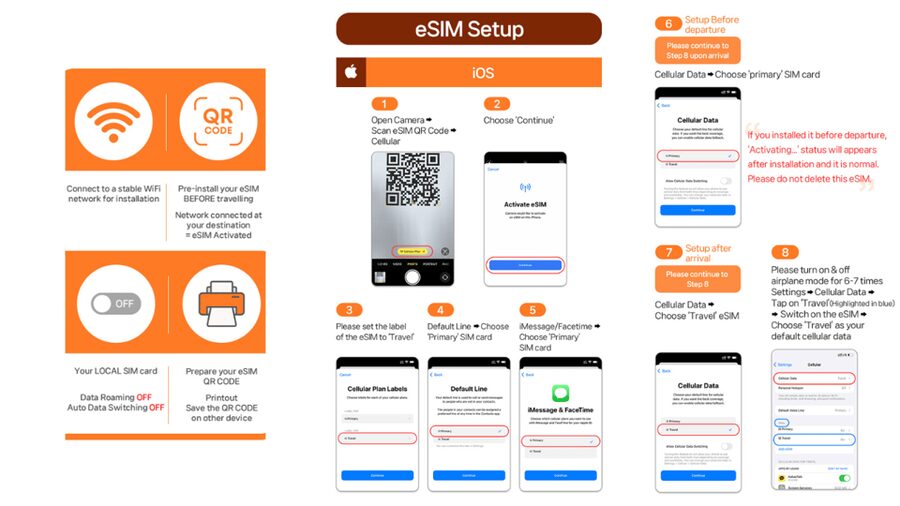
When you are ready, the process is straightforward: you receive the eSIM QR, you scan it, you install the eSIM, and you connect to the network. The data connection itself is described as connecting after you arrive in Japan, not before.
Before You Land: Device Checks That Save Time
Before you spend 10 bucks, do two quick checks. They can save you from a frustrating day at the airport.
First, confirm your phone supports eSIM. You can do this by dialing #06# and checking whether EID shows. If EID does not appear, the device is incompatible with eSIM based on the info provided.
Second, make sure your phone is unlocked for a foreign SIM or eSIM. If your phone is locked to one carrier, the eSIM install will fail, even if the data plan itself is fine.
One more practical tip for travelers: take a screenshot of your eSIM setup steps from the guide link provided in the plan info. Even if you think you will remember, travel days are noisy. Having the instructions handy can reduce “where do I tap again?” time.
Same corner of Japan, a different kind of day:
- Tokyo: teamLab Planets TOKYO Digital Art Museum Entry Ticket
★ 4.6 · 9,779 reviews - Mt Fuji & Hakone Cruise, Drum Show Bullet Train 1 Day from Tokyo
★ 4.0 · 7,413 reviews - Tokyo: Sumo Show Experience with Chicken Hot Pot and a Photo
★ 4.8 · 6,678 reviews - Tokyo: Shinjuku Food Tour (13 Dishes at 4 Local Eateries)
★ 5.0 · 6,603 reviews
Activation Day in Japan: Connecting to KDDI au
Here is what you can expect when you finally land.
The eSIM is connected to the local network after you arrive in Japan. So you should not treat installation as the same thing as being online. Installation gets the eSIM ready, and then connection happens once you are in Japan and your phone can reach the network.
That also affects your thinking about timing. The plans are calculated based on calendar days. For Lite, you should know how the service counts days: it is calculated starting from the first connection to the KDDI au network in Japan, and an activation at 10 PM Japan time counts as one full day by midnight. In other words, late arrival still costs you the day even if you connect briefly at night.
Ultra duration is stated as 3 to 30 days, and Lite is 3 to 10 days. The key takeaway is to connect when you land, not when you get home, and try to avoid sitting on installation without actually triggering connection in Japan.
How the Data Feels Day to Day, Even on the Subway
What matters on the ground is not just whether you can get online, it is how the connection behaves where you actually spend time.
The plan is built for fast connectivity because it supports 5G/4G locally on KDDI au. In practical use, people report easy setup and signal availability in places that usually stress cell networks, including subways. If you rely on transit schedules, station maps, and quick directions, data that works underground is a big quality-of-life boost.
There is also an important realism note included in the plan info: 5G signal may be affected by location, such as indoors, underground, or in crowded areas. When that happens, your phone may switch to 4G. That is normal phone behavior, and it is good to know so you do not panic when 5G disappears for a while. Your apps should still work over 4G, just with potentially less speed.
If you are coming from a country where “no bars” means “no data,” Japan can still surprise you. Trains, dense neighborhoods, and station basements can change signal quickly. Having a plan that keeps you on KDDI au coverage and supports both 5G and 4G is what you want for day-to-day resilience.
Using Hotspot Without Surprises
Hotspot support is included, but it comes with limitations depending on the selected plan. Since the limits are not spelled out in the provided details, you should treat hotspot as “useful, not limitless.”
For planning, I’d frame hotspot this way:
- If you want to share data with a second phone or a tablet for maps and messaging, hotspot can be a great backup.
- If you want to turn your phone into a full household hotspot for heavy downloads, streaming hours on end, or gaming, you should plan for restrictions.
People also mention sharing with other phones as part of real-world use, which suggests hotspot works enough for typical travel sharing. Still, if you are traveling with a companion who might try to stream nonstop, you may want to set expectations before you land.
If Things Go Sideways: Fixing Invalid QR Code Errors
When an eSIM process fails, the most common culprit is not the plan, it is the install state.
If you see a message like QR code is invalid, follow the troubleshooting steps listed:
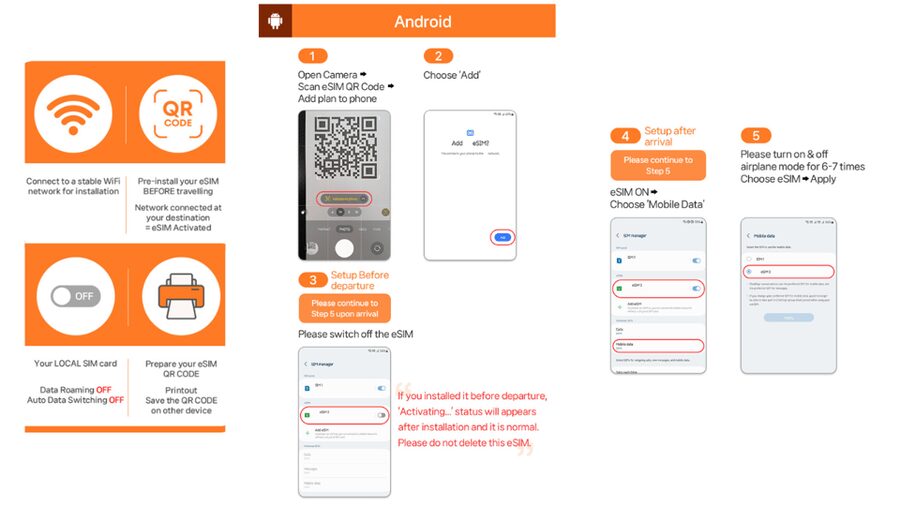
- On iOS, go to Settings > Cellular and look for a new eSIM.
- On Android, go to Settings > Connections > SIM Manager and check whether the new eSIM appears.
That is your first move because it tells you whether the scan actually created an eSIM profile. If it did not, you may need to reinstall using the correct QR code from your email.
If it still does not work, contact the supplier via the email or WhatsApp method noted in the plan info. That direct support route matters with eSIMs, because the difference between a working and non-working install can be a detail like the QR code timing or the phone profile state.
Also remember: the voucher QR is not the eSIM QR. If you are scanning the wrong thing, you can end up thinking the plan is broken when it is simply the wrong code.
Practical value for $10: Who this fits best
At $10 per person, the value comes from the combination of unlimited local data and low friction. You are not paying per gigabyte. You are paying for a predictable “stay connected” experience during a Japan trip, with KDDI au coverage and support for both 5G and 4G.
Who benefits most:
- You want to rely on maps, translation tools, and messaging without juggling Wi-Fi passwords
- You are comfortable with a data-only SIM style setup, since voice and SMS are not included
- You have a compatible eSIM phone and an unlocked device
Who might want a different plan:
- You need SMS for verification while offline, and you do not have an alternate way to receive codes
- You depend on hotspot for heavy use, especially if you need it all day
- Your phone is not eSIM-ready, since the plan requires eSIM compatibility
Price matters, but timing matters too. Since Ultra can run up to 30 days and Lite is limited to 10 days, your trip length should drive your choice. If you are doing a longer itinerary, Ultra may be the better fit even if Lite sounds tempting at first.
Should you book this Japan eSIM?
If you want one simple tool to keep your trip stress-free, this is an easy yes for most people who travel with a data-first lifestyle. The best reason to book is the unlimited 5G/4G local data promise on KDDI au, paired with an installation flow that avoids the fuss of a physical SIM card.
Before you buy, do three quick checks: confirm your phone shows EID with #06#, make sure it is unlocked, and plan to install using the eSIM QR emailed 1 day before your date. If those boxes are checked, you are set up for fast online access and less time hunting for Wi-Fi in Japan.
If your trip is long, lean toward Ultra. If your trip is short and you mainly need navigation and messaging, Lite can be a solid budget match, just remember the 10Mbps cap.
FAQ
When will I receive the eSIM QR code?
The QR code for the eSIM is delivered to you separately via email 1 day before the activity date. The voucher QR code is not the eSIM QR code.
Does the eSIM connect immediately after installation?
The eSIM will connect to the local network after you have arrived in Japan.
What is the difference between Ultra and Lite?
Ultra provides unlimited 5G/4G local data with no throttling listed. Lite also provides unlimited 5G/4G local data, but with a maximum speed of 10Mbps.
Can I use hotspot sharing with this plan?
Hotspot sharing (tethering) is included, but it comes with limitations depending on the selected plan.
Does this eSIM include voice calls and SMS?
No. Voice and SMS are listed as not included.
What should I do if I see a QR code is invalid message?
Check your phone’s settings for a new eSIM profile. On iOS, look in Settings > Cellular. On Android, look in Settings > Connections > SIM Manager. If it still fails, contact the supplier by email or WhatsApp.
Fresh options around Tokyo
- Tokyo: Nikko Kegon Falls Lake Chuzenji Toshogu Temple & More★ 4.9 · 12 reviews
- Tokyo: Samurai History Walking Tour★ 5.0 · 12 reviews
- Harajuku: Kawaii Fashion and Pop-Culture Tour★ 4.7 · 12 reviews
- Tokyo: Mt. Fuji & Lake Kawaguchi Instagram Full Day Trip★ 4.1 · 12 reviews
- Shibuya Tokyo: Modern Kintsugi Workshop in Shibuya★ 5.0 · 12 reviews
- Tokyo: GTR Guided Daikoku Experience at Night★ 5.0 · 12 reviews
- Tokyo: Daikoku JDM Car Culture Tour★ 4.6 · 12 reviews
- Mt Fuji Private Day Trip from Tokyo with English speaking driver★ 5.0 · 13 reviews
Tokyo Tours, compared.

Mt Fuji and Hakone 1-Day Bus Tour Return by Bullet Train
Read our review →


teamLab Planets TOKYO Digital Art Museum Entry Ticket
Read our review →
Mt Fuji & Hakone Cruise, Drum Show Bullet Train 1 Day from Tokyo
Read our review →
Sumo Show Experience with Chicken Hot Pot and a Photo
Read our review →
Shinjuku Food Tour (13 Dishes at 4 Local Eateries)
Read our review →