
Reviewed · AIRPORT TRANSFERS
Unlimited WiFi Router – Haneda Airport (Tokyo) Pickup
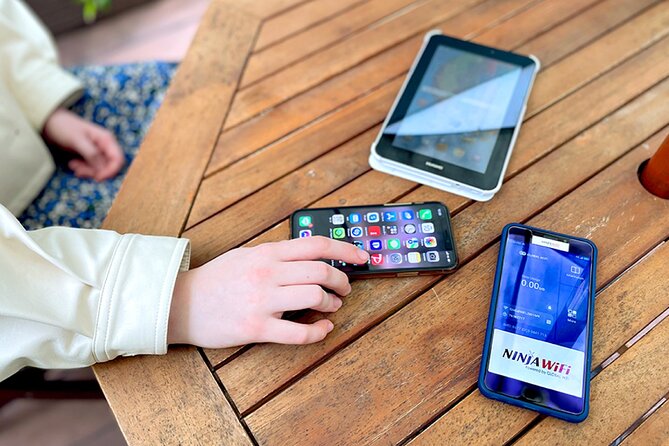
Airport WiFi at pickup saves real stress. With the NINJA WiFi router at Haneda, you can start using 4G LTE the minute you land, and the pickup window (6:45am to 11:45pm) keeps you from timing your whole day around the counter. I like that it is marketed for unlimited usage, but there is one real catch: high-speed data is limited to 3GB per day.
For groups, I really like the convenience of connecting up to 10 devices on one pocket hotspot, plus the included power bank so you are not hunting for an outlet right away. The setup kit also makes it feel like a ready-to-go travel tool, not a “figure it out later” gadget.
One more practical plus: the pickup and return counters are outside airport security, which usually makes the whole process faster once you exit baggage claim. It is also designed for easy, quick participation, with a small max group size.
Key highlights to know
- Pickup hours at Haneda are long: 6:45am to 11:45pm, with terminal-specific counters and return boxes
- 4G LTE router for on-arrival use so you can check Google Maps and messaging immediately
- Unlimited usage with a daily limit on high speed (3GB per day)
- One router can serve a small group with support up to 10 devices (and some notes also mention up to 5)
- Power bank included to keep your phone and the router moving through the day
- Counters are outside security for simpler arrival logistics
Airport WiFi at Haneda: Getting Online Without Burning Time

The best part of this experience is that it is built around real arrival anxiety. Land at Haneda, and instead of hunting for airport WiFi that may be slow or flaky, you get a pocket router you can use right away. That matters in Japan, because getting oriented fast usually means finding the right train line, checking station exits, and confirming your next stop before you commit to a route.
This pickup experience is also tuned for flexibility. You are not locked into a tiny pickup window. The main guidance is to collect it from 6:45am to 11:45pm, which helps if your flight lands late, or if you want to take your time through immigration and baggage.
From the descriptions and customer feedback, what stands out most is how quickly it can start working. The most praised aspect is the simple process, showing up with the right documents, and getting connected with minimal fuss. That is the kind of travel “quality of life” you feel immediately once you start moving through Tokyo.
A few more Tokyo days worth comparing
- Haneda Airport (HND) Private Transfer to Central Tokyo
★ 4.5 · 636 reviews - Narita Airport (NRT) Private Transfer to Central Tokyo
★ 4.5 · 300 reviews - Private Haneda Airport (HND) to Central Tokyo City Transfer
★ 4.5 · 260 reviews
The main thing to plan for
High-speed data is limited to 3GB per day. The good news is that you can still use the connection beyond that. The practical takeaway is to treat the fast part like your daily streaming and navigation budget. If you plan to watch lots of videos on the go, keep an eye on your usage patterns.
Where to Pick Up: Terminal 2 vs Terminal 3 Counters
Haneda can feel like a maze if you are tired. So I like that the pickup instructions spell out where to go, by terminal, and even name the counters.
Terminal 3
- Pick-up/return counter: 2F Arrivals Lobby, Global WiFi x NINJA WiFi Counter
(06:30 to 23:45)
- Return box for late hours: 2F Arrivals Lobby, JAL ABC Counter
(23:45 to 06:30)
Terminal 2
- Pick-up/return/return box: Terminal 2, 2F
J WiFi & Mobile x Global WiFi Counter (6:00 to 23:00)
A few small details matter here. First, the counters are outside airport security, so you go there after you clear arrivals procedures but before you head deeper into the secure transit zones. Second, the instructions repeatedly stress using the arrival terminal. That is your map to avoid wandering.
My practical tip for finding the counter fast
When you land, keep your reservation confirmation and passport easy to access. The setup is designed to be document-based, and several comments highlight how smoothly it went once the printed or shown reservation details were ready.
Same corner of Japan, a different kind of day:
- Mt Fuji and Hakone 1-Day Bus Tour Return by Bullet Train
★ 5.0 · 26,383 reviews - 1-Day Tokyo Bus Tour
★ 5.0 · 14,250 reviews - Tokyo: TOKYO SKYTREE® Admission ticket
★ 4.5 · 11,192 reviews - Tokyo: teamLab Planets TOKYO Digital Art Museum Entry Ticket
★ 4.6 · 9,779 reviews
4G LTE on Arrival: What Unlimited Really Means for Your Trip
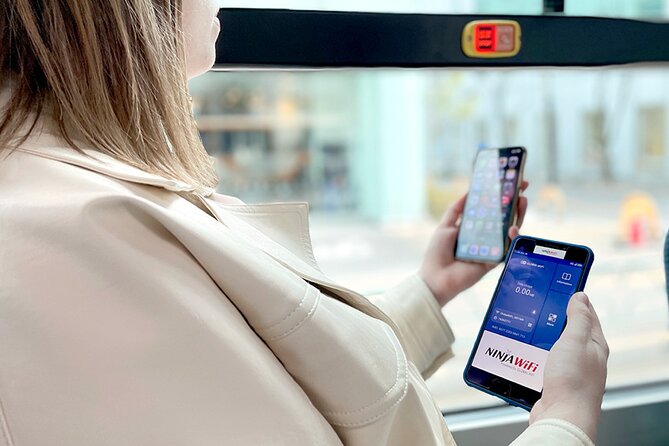
This router uses a 4G LTE hotspot connection. That is the right kind of tech for travel because it usually keeps up with real-time needs: checking routes, reading messages, and searching when you have a quick question.
The marketing says unlimited usage. At the same time, high-speed data is limited to 3GB per day. So what does that mean for how you will use it?
Here is how to think about it:
- For Google Maps and navigation, you should be fine most days, as long as you do not constantly reload and stream video at the same time.
- For messaging and posting photos, you should get plenty of use from the fast period.
- For YouTube and heavy streaming, you will likely want to save your most bandwidth-heavy watching for WiFi moments at hotels, or you will chew through the high-speed allowance quickly.
The good part is you are not relying on a single airport hotspot. You carry your internet with you. That is huge when you are changing neighborhoods, moving between stations, and trying to translate signs or confirm train changes on the fly.
Device Limits: One Router, How Many People Can Share?
If you are traveling with friends or family, this is a big deal. The experience description says you can connect to up to 10 devices. Another section describes connecting up to 5 devices at once. That is a discrepancy, and it affects how you should plan.
Here is my practical approach:
- If you are a small group, assume you can share it comfortably.
- If you are a larger group, try to be realistic about the simultaneous connections. One router can serve multiple phones, but your best experience usually comes when not every device is streaming.
Also remember that the real limiter is not just device count. It is daily data behavior. Even if your group is connected, lots of video playback will hit that 3GB per day high-speed cap faster.
Who this device sharing fits best
- Families sharing one navigation device plus a few phones for messages
- Small travel groups splitting costs while still keeping everyone independent
- Anyone who hates asking strangers for WiFi access at train stations
Power Bank Included: The Tiny Detail That Keeps You Moving

I love it when an arrival service includes the “boring” essentials. Here, you get a router plus a power bank and a charger setup, including a USB cable and adapter. There is also a WiFi pouch, which sounds small, but matters when you are juggling passports, tickets, train passes, and bags.
Why it matters: if your phone is running low, you will feel it right away. In Tokyo, your phone becomes your map, your translation tool, your ticket checker, and your contact list. Having the power bank ready makes it easier to keep everything alive without sprinting to find a charging station.
Several comments specifically call out that the device was ready during the day without constant recharging. I would still treat it as a “use it as needed” system, because your own phone usage will vary.
Using It in Tokyo: Maps, Social Apps, and Real Travel Flex

The feature list is pretty clear about what you can do: check Google Maps, use Facebook and Instagram, and watch YouTube videos. In other words, it is not limited to a basic messaging-only experience.
In real Tokyo travel terms, that means:
- You can confirm where your train leaves from, rather than guessing based on signage you barely read.
- You can check opening hours and directions when plans change.
- You can keep work chats or family messages going without needing to locate a cafe WiFi password.
One thing I appreciate is that it is designed for immediate use after landing. That avoids the common “first day blindfold” problem where everyone is scrambling for a connection while you are still learning the station layout.
A note on signage and airport navigation
A couple of details in customer feedback point to small wayfinding issues, like maps in the airport area not matching your expected drop-off spot, or the business sign being harder to see from where you first enter. So do this: once you arrive, look for the counter name instructions and have a screenshot ready. It is faster than trying to interpret vague directions while tired.
How Long You Rent It: 3 to 30 Days, Up to 90 Days Device Life

The experience duration is listed as about 3 to 30 days. That fits most trip lengths, from a long weekend to a full month of travel. Another line says the router can last up to 90 days, which is about the device capability window.
For your planning, treat it like this:
- Your rental period matches your trip length, commonly within 3 to 30 days.
- The router itself is described as lasting up to 90 days, which is about the potential lifespan of the unit, not necessarily your rental time.
If you are booking for a shorter trip, the value tends to be highest on day one, because the router gives you immediate navigation and communication. If you are booking for a longer trip, you get ongoing convenience without repeating setup steps across multiple devices or providers.
Return at Haneda: Using the Right Terminal and Return Window

This is not the most glamorous part of the trip, but it is where small mistakes can happen. The return process is terminal-specific and time-specific, so you want to line it up before you head out.
Terminal 3 return window details
- Return counter: until 23:45
- Return box after 23:45 into the early morning, using the JAL ABC Counter location (23:45 to 06:30)
Terminal 2 return details
- Return/return box is covered under the Terminal 2 counter hours (6:00 to 23:00)
Also note: refund is not provided if you do not collect the WiFi router. So if your plans change dramatically, double-check that you still pick up the device within your trip flow.
A smart final-day routine
As you plan your departure day, confirm which terminal you are leaving from and what time you will actually get there. If you are landing your flight at a time that falls near the edges of the return counters, plan to return within the official window or use the correct return box guidance for that late-night period.
Price and Value: Is $14.48 Per Person Worth It?

At $14.48 per person, this is priced like a cost-effective add-on for a multi-day Tokyo trip. The real question is value, not just cost.
I see the strongest value when:
- You need maps and directions constantly, especially during your first days when you do not know which train exits you prefer.
- You are traveling with others, because one router can support multiple devices.
- You want to avoid relying on spotty airport or hotel WiFi when you are out exploring.
The one tradeoff to keep in mind is the 3GB per day high-speed limit. If your plan is to stream lots of video every day on the go, you might feel the pinch. But for normal travel use, including navigation, messaging, and browsing, the capped high-speed daily allowance is usually manageable.
Who should book this
This pickup works best for:
- First-time Tokyo visitors who want immediate orientation
- Groups who can share one hotspot
- Anyone who values not getting stuck offline mid-day
- Travelers who want a quick airport grab-and-go solution (not a long tech setup)
Should You Book This Haneda Airport WiFi Pickup?
If your priority is to start using maps and communication the moment you land, I think this is an easy yes. It is built for arrival convenience, the pickup times are generous, and the included kit is designed to get you connected fast. The strongest praise centers on smooth pickup and dependable connectivity, which is exactly what you want from an airport service.
I would book it with one planning mindset: manage your data expectations because high-speed is capped at 3GB per day. If you are a heavy streamer, plan your biggest videos for WiFi at your hotel, and save the router for navigation and messaging.
If you want simple airport internet without extra hassle, this is a solid, practical choice for Haneda arrivals.
FAQ
Where do I pick up the WiFi router at Haneda Airport?
It depends on your terminal. For Terminal 3, pick up at the 2F Arrivals Lobby Global WiFi x NINJA WiFi Counter. For Terminal 2, pick up at Terminal 2, 2F J WiFi & Mobile x Global WiFi Counter.
What are the pickup hours for each terminal?
Terminal 3 pickup/return counter runs 06:30 to 23:45, and there is a return box option from 23:45 to 06:30. Terminal 2 pickup/return runs 6:00 to 23:00.
How long can I rent the router for?
The experience duration is listed as approximately 3 to 30 days. The router is also described as lasting up to 90 days.
Is the connection unlimited?
The router is described as unlimited usage, but high-speed data is limited to 3GB per day.
How many devices can connect to the router?
The details include up to 10 devices, but another note states it can connect up to 5 devices at once.
What is included in the kit?
You receive the WiFi router, a USB cable, an adapter, a WiFi pouch, and a power bank.
Can I use it right after I land?
Yes. The instructions emphasize that you can start using the internet as soon as you arrive at Haneda.
Where are the pickup and return counters located?
They are located outside of airport security, near public transportation.
What happens if I do not collect the router?
Refunds are not provided for not collecting the WiFi router.
Can I cancel my booking for free?
Yes. You can cancel up to 24 hours in advance for a full refund. If you cancel less than 24 hours before the experience starts, the amount paid will not be refunded.
Fresh options around Tokyo
- Tokyo: Nikko Kegon Falls Lake Chuzenji Toshogu Temple & More★ 4.9 · 12 reviews
- Tokyo: Samurai History Walking Tour★ 5.0 · 12 reviews
- Harajuku: Kawaii Fashion and Pop-Culture Tour★ 4.7 · 12 reviews
- Tokyo: Mt. Fuji & Lake Kawaguchi Instagram Full Day Trip★ 4.1 · 12 reviews
- Shibuya Tokyo: Modern Kintsugi Workshop in Shibuya★ 5.0 · 12 reviews
- Tokyo: GTR Guided Daikoku Experience at Night★ 5.0 · 12 reviews
- Tokyo: Daikoku JDM Car Culture Tour★ 4.6 · 12 reviews
- Mt Fuji Private Day Trip from Tokyo with English speaking driver★ 5.0 · 13 reviews
Airport Transfers, compared.
Haneda Airport (HND) Private Transfer to Central Tokyo
Read our review →
Narita Airport (NRT) Private Transfer to Central Tokyo
Read our review →
Private Haneda Airport (HND) to Central Tokyo City Transfer
Read our review →
Narita Airport(NRT) Private Transfer To/From Tokyo 1-way or Round
Read our review →
Tokyo Disneyland or DisneySea Ticket & Door to Door Transfer
Read our review →
Private arrival Transfer from Narita Airport(NRT) to central Tokyo city
Read our review →
Private departure transfer from Tokyo city to Tokyo Haneda Airport(HND)
Read our review →
Tokyo private transfer to Haneda Airport (HND)
Read our review →Browse the lists this tour appears in