
Reviewed · AIRPORT TRANSFERS
Japan Unlimited WiFi Router – Narita Airport Pickup
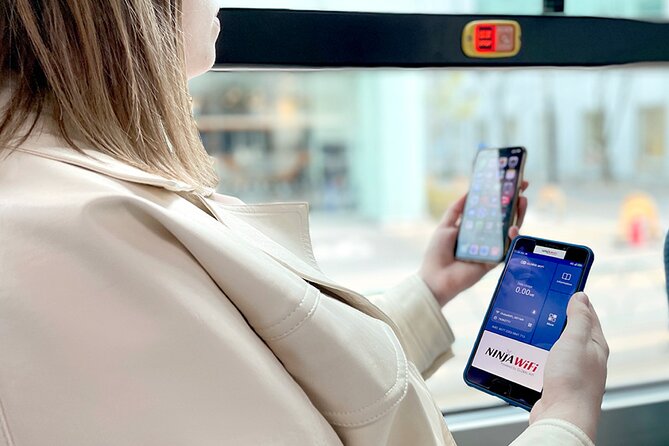
A working internet connection changes how you move in a new country. This Narita Airport Wi-Fi rental gets you 4G LTE access fast, with pickup at Terminal 1 or 2 so you can start navigating right after you land. It is a simple way to make Tokyo transit, ride shares, and real-time map checks feel normal.
I especially like how easy the pickup and setup can be. One key positive is that the router is ready at the counter when you arrive, and the included gear (including a power bank) makes it straightforward to get online. My second favorite thing is the practical range of rental choices, from a few days up to longer trips, so it matches how most people actually travel.
One consideration: the data is not truly unlimited. High-speed usage is capped at 3GB per day, so if you plan heavy video streaming, you will want a strategy.
Key things to know before you go
- Pickup at Narita Terminal 1 or 2, with counters outside airport security
- 4G LTE Wi-Fi intended to help you use maps and common apps on the go
- 3GB per day high-speed limit, so budget data if you stream a lot
- Includes router, USB cable, adapter, and power bank for quick start
- Connects multiple devices, but published limits vary (up to 10 in one place, up to 5 in another)
- Small group size up to 10 for the pickup experience
Why a Narita Airport Wi-Fi Router Makes Tokyo Days Easier

Narita to the city can feel like a mini maze, even if you have done your homework. Having your own Wi-Fi hotspot removes the pressure of finding public Wi-Fi, logging in again, or waiting until you are settled.
This rental is built for that first-day reality. You grab the router at Narita (Terminal 1 or Terminal 2), then you are online while you figure out which train line to take, where your hotel is on the map, and what platform you should target. It also helps for everyday tasks like checking transit updates, using translation tools, and finding food options while you are walking around.
I also like that this is designed as a low-friction solution. You get the core hardware ready for travel, including a power bank, USB cable, and adapter, so you do not need to hunt down extra charging bits before you can even test the connection.
A few more Tokyo days worth comparing
- Haneda Airport (HND) Private Transfer to Central Tokyo
★ 4.5 · 636 reviews - Narita Airport (NRT) Private Transfer to Central Tokyo
★ 4.5 · 300 reviews - Private Haneda Airport (HND) to Central Tokyo City Transfer
★ 4.5 · 260 reviews
How Pickup Works at Narita, Terminal 1 or 2
The main “plan” here is simple: you pick up your rented device at Narita Airport near Tokyo, at counters outside security. That matters because it keeps your first airport steps clean. You can handle the rental before you go deeper into the terminal, rather than trying to solve tech issues after you are already committed to security.
The process is also described as using a mobile ticket, which typically means you are not fumbling for a paper voucher. You should expect confirmation at booking time, and then show what you need at the counter.
A useful detail for your expectations: the pickup and return counters are located outside airport security, and the area is near public transportation. That is good news if your schedule is tight or you are catching a bus or train soon after landing.
One caution from a real-world problem case: one person reported asking for hotel delivery, and it never arrived. If you are planning something beyond the airport pickup described here, make sure you have that arrangement fully confirmed in advance, and do not assume it will be handled automatically.
What You Get in the Box: Router, Power Bank, and Cables
The included items are what make this feel practical, not just theoretical.
You receive:
- A Wi-Fi router for 4G LTE access
- A USB cable
- An adapter
- A power bank
That bundle directly affects how smoothly your first hour goes. The router is the heart of the setup, but the power bank is what saves you when you are bouncing between airport, station, and street directions. In Japan, you may see lots of power outlets, but they are not always where you want them, when you want them.
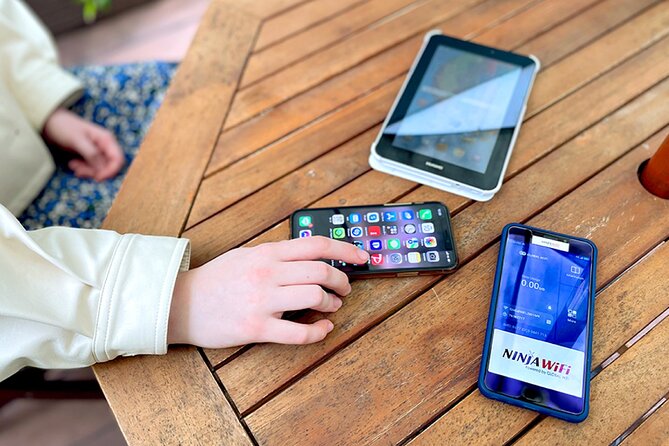
Another plus is that the device is described as being able to connect multiple phones or tablets. One part of the information says up to 10 devices, while another note says up to 5 devices. Either way, you should treat it as a “share a connection, not a studio setup” situation. If you have a group with many devices, plan to keep the hotspot user count reasonable.
4G LTE Wi-Fi That Helps You Navigate in Real Time

The promise here is straightforward: access Wi-Fi anywhere in Japan using a 4G LTE connection. In real life, this is most valuable for navigation and on-the-go searches.
With this kind of connection, you can realistically use:
- Google Maps for transit and walking directions
- Social apps like Facebook and Instagram
- Video apps like YouTube
- Messaging and general browsing
The key is that you can check and re-check routes as your plans change. Japan is incredibly organized, but stations are big, signs can be detailed, and sometimes you will change your mind. A hotspot keeps that flexible.
Also, having your connection immediately after arrival helps with little timing decisions. You can look up station exits, confirm the next train, and decide whether it makes sense to walk or take a short ride. That can save both time and energy.
Same corner of Japan, a different kind of day:
- Mt Fuji and Hakone 1-Day Bus Tour Return by Bullet Train
★ 5.0 · 26,383 reviews - 1-Day Tokyo Bus Tour
★ 5.0 · 14,250 reviews - Tokyo: TOKYO SKYTREE® Admission ticket
★ 4.5 · 11,192 reviews - Tokyo: teamLab Planets TOKYO Digital Art Museum Entry Ticket
★ 4.6 · 9,779 reviews
Unlimited Wi-Fi, With a 3GB Daily Limit

Here is the catch you should take seriously: high-speed data is limited to 3GB per day.
So what does that mean for your day-to-day usage? You can absolutely use maps, check translations, and browse casually. But if you are the type who streams video for long stretches, or you run multiple devices all day, you may feel the cap sooner than you expect.
My practical advice: plan your data-heavy behavior for off-peak times or for moments when you are not relying on the connection as much. For example, you might save longer YouTube viewing for when you are back at a hotel or resting. Meanwhile, keep your hotspot focused on the jobs that matter most for getting around.
If your travel style is light (maps, chat, a few searches), this setup will likely feel like true “unlimited” freedom. If you treat it like a home cable connection, the daily cap will eventually become the thing that shapes your choices.
Connecting Multiple Devices: What Works Best for Couples and Small Groups

Hotspots are always a little different from home Wi-Fi. They are sharing a single cellular connection, so performance depends on the number of devices and what each one is doing.
This rental is described as connecting multiple devices, with published limits that vary. One detail says up to 10 devices, and another note says up to 5 devices. When information conflicts like that, the safe move is to plan toward the smaller number and treat the extra as a best-case scenario.
Who benefits most?
- Couples on phones and navigation apps
- Families where one adult handles maps and the other uses messages
- Small groups who can share one person’s device for heavy tasks
Who might find this annoying?
- Large groups with everyone streaming video simultaneously
- Anyone expecting a hotspot to behave like unlimited home broadband for multiple laptops
The good news is that many phones do not need constant high-bandwidth to be useful. If you keep the connection for core navigation and communication, you will get more value from your rental.
Returning the Router and Avoiding Extra Hassles

Your last-day goal is to return the device smoothly. The return counters are at the same style of location as pickup, outside airport security. That is convenient if your departure day is already complicated.
Also, there is a firm note: refunds are not provided for not collecting the Wi-Fi router. So treat collection as essential, not optional. If you arrive and the counter is busy or your timing is tight, give yourself enough slack to handle pickup without rushing.
Another small but important thing: the rental duration can be as short as 3 days and as long as 30 days. If you are near the end of your trip, double-check your return timing so you do not end up paying attention to tech while you should be managing flights.
Price and Value: Is $15.85 Per Person a Smart Move?

At $15.85 per person, this Wi-Fi rental can be good value, especially when you add up what you would otherwise spend on time and frustration. The biggest “hidden cost” of no data is mental load. You constantly second-guess directions, you wait to find Wi-Fi, and you risk getting stuck when you are already out walking.
What you are paying for here is reliable access that starts at the airport. If you land and immediately use maps, translation, and communication without hunting for Wi-Fi, the rental quickly earns its keep.
Still, value depends on your data habits:
- If you will use navigation daily and need messaging, this is likely a smart spend.
- If you barely need internet and could survive on offline maps, you might feel you overpaid.
- If you plan lots of streaming on multiple devices, the 3GB per-day cap may reduce perceived value.
Also think about group math. Even though the price is per person, the hotspot itself is meant to cover multiple devices. If you are traveling with someone else, you can often split the value if you manage device usage sensibly.
In short: for most people, paying for a hotspot at Narita is cheaper than paying in lost time and stress. For heavy data users, you need a plan so the daily cap does not surprise you.
Practical “First Day” Strategy That Makes This Feel Effortless
Here is how I would use this rental to get the best results.
First, when you pick up the router, charge it right away and test the connection quickly. That way, you have a working setup before you leave the airport area. If you are arriving late, this is especially helpful because you do not want to troubleshoot at the exact moment you are trying to catch a train.
Next, set up your core devices and keep things simple. Use the hotspot for:
- navigation
- messaging
- translation
- quick searches
Then, treat video streaming as optional. With 3GB per day high-speed data, you will get more comfortable use if you limit long sessions of high-bandwidth content.
Finally, remember that connections are shared resources. If multiple people are on heavy apps at once, performance can drop. I recommend choosing one person as the navigation lead and coordinating who does what on the devices.
Who This Suits Best, and Who Might Skip It
This rental fits best when you want your first hours in Japan to feel manageable.
It is a strong match if you:
- are landing at Narita and want immediate access to maps
- prefer not to depend on random public Wi-Fi
- are traveling for 3 to 30 days and want one consistent connection solution
- have a small group and can keep device use reasonable
It might not be ideal if you:
- need nonstop high-bandwidth video on multiple devices every day
- expect true unlimited use without the daily cap affecting you
- rely on hotel delivery, since this service is described around airport pickup
Should You Book a Narita Airport Wi-Fi Router Rental?
Book it if you want practical freedom the moment you land. I think it is especially worth it for people who plan to use transit and walk around on their own, because the hotspot turns navigation from a chore into a tool.
You should pause and plan your usage if you are a heavy streamer, or if you expect a big group with many devices connected nonstop. In that case, the 3GB per-day high-speed limit will shape your day, even if you still have connectivity.
My final take: for most trips, $15.85 per person for quick Narita pickup plus a power bank is a very workable way to avoid the classic first-day internet headaches. If you go in with a data plan and stick to the airport pickup flow, it is the kind of simple prep that makes the whole trip feel easier.
FAQ
How much does the Narita unlimited Wi-Fi router rental cost?
The price is listed as $15.85 per person.
Where do I pick up the Wi-Fi router at Narita?
Pickup counters are located outside airport security at Narita International Airport, at either Terminal 1 or Terminal 2.
How long can I rent the router?
The rental duration is approximately 3 to 30 days.
Is the Wi-Fi unlimited?
The rental is described as unlimited Wi-Fi, but high speed data is limited to 3GB per day.
How many devices can connect to the hotspot?
The information provides two different limits: one part says up to 10 devices, and another note says up to 5 devices.
What’s included with the rental?
You receive the Wi-Fi router, plus a USB cable, an adapter, and a power bank.
Do I get a ticket by mobile?
Yes, it says mobile ticket. Confirmation is received at the time of booking.
What if I do not collect the router?
Refunds are not provided for not collecting the Wi-Fi router.
Can I cancel for a full refund?
Yes, you can cancel for a full refund as long as you cancel at least 24 hours before the experience start time.
Fresh options around Tokyo
- Tokyo: Nikko Kegon Falls Lake Chuzenji Toshogu Temple & More★ 4.9 · 12 reviews
- Tokyo: Samurai History Walking Tour★ 5.0 · 12 reviews
- Harajuku: Kawaii Fashion and Pop-Culture Tour★ 4.7 · 12 reviews
- Tokyo: Mt. Fuji & Lake Kawaguchi Instagram Full Day Trip★ 4.1 · 12 reviews
- Shibuya Tokyo: Modern Kintsugi Workshop in Shibuya★ 5.0 · 12 reviews
- Tokyo: GTR Guided Daikoku Experience at Night★ 5.0 · 12 reviews
- Tokyo: Daikoku JDM Car Culture Tour★ 4.6 · 12 reviews
- Mt Fuji Private Day Trip from Tokyo with English speaking driver★ 5.0 · 13 reviews
Airport Transfers, compared.
Haneda Airport (HND) Private Transfer to Central Tokyo
Read our review →
Narita Airport (NRT) Private Transfer to Central Tokyo
Read our review →
Private Haneda Airport (HND) to Central Tokyo City Transfer
Read our review →
Narita Airport(NRT) Private Transfer To/From Tokyo 1-way or Round
Read our review →
Tokyo Disneyland or DisneySea Ticket & Door to Door Transfer
Read our review →
Private arrival Transfer from Narita Airport(NRT) to central Tokyo city
Read our review →
Private departure transfer from Tokyo city to Tokyo Haneda Airport(HND)
Read our review →
Tokyo private transfer to Haneda Airport (HND)
Read our review →Browse the lists this tour appears in